
User`s manual




Zaxcom Deva User’s Manual_______________________________________________________ Chapter 3
141
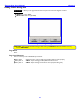
Debug Screen dialog box
Page purpose: It allows you to upgrade the firmware and perform some basic diagnostic routines.
How to get here:
(MENU key Type 1967)
(Mode Status button Type 1967)
Figure 3-75 Debug Screen page
CAUTION: Once you have finished working in 1967 mode, you SHOULD reboot the machine or it may
become UNSTABLE.
Page Notes
None
Page Level Shortcuts
Here is a summary of the available F5 key commands:
F5 key then 1 – Restart the Deva. This can help some FireWire devices mount properly.
F5 key then 4 – NEW – Import settings (INI files) FROM the Mirror Drive.
F5 key then 5 – NEW – Export settings TO the Mirror Drive (and print debug info).