
User`s manual



Zaxcom Deva User’s Manual_______________________________________________________ Chapter 3
119
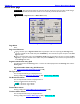
Formatting dialog box
Page purpose: Performs the Erase and Format process for the Primary Drive.
How to get here:
(MENU key My Deva button Internal HD drive button Format Drive button) Format Drive
button
Figure 3-59 Formatting dialog box on top of Format Menu Warning page
Page Notes
The following is an example of what is displayed in the FORMATTING dialog. Be aware that this will change
based on the size of the media being formatted:
Formatting Internal Disk
Mounting Internal Disk
BytesPerSector=512 SectorsPerCluster=64
Counting Free Clusters…
10% 20% 30% 40% 50% 60% 70% 80% 90% 100% 489345 Free
Clusters
Creating ZDIR.ZZZ
Creating </INTHD/ZFILES/ZBLK0000.ZAX>
.
.
.
Creating </INTHD/ZFILES/ZBLK0131.ZAX>
Creating final wrapper file </INTHD/ZFILES/ZBLK0132.ZAX>
Copying FAT…
Erasing Folder z001
.
.
.
Erasing Folder z127
WrDimg2Disk folder[1] Seg 000
Format is complete. RE-START Deva NOW
Figure 3-60 Screen Display of the Primary Drive Format process
NOTE: It takes about 7 minutes to reformat a 137 GB HDD.
Page Level Shortcuts
None