
User`s manual




Zaxcom Deva User’s Manual_______________________________________________________ Chapter 3
107
Digital Input (#) – BUS page
Page purpose: This page maintains the BUS settings for each digital recording track.
How to get here:
(MENU key Input Configure button Analog Inputs Toggle button {=Digital} Digital (#) buttons
BUS button)
Deva-16 view Deva-5.8 view
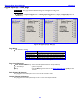
Figure 3-50 Digital Input (#) - BUS page
Page Notes
The indicator’s meaning:
Indicator
Description
Black D
Digital input post-fader
Black D with Line
Digital input post-fader with signal phase inverted
White D
Digital input pre-fader
White D with Line
Digital input pre-fader with signal phase inverted
Table 3-7 Indicator Descriptions
Page Level Shortcuts
LEFT / RIGHT ARROW keys – select which bus (Disk Channel vs. Output Channel)
1 – 9 and 0 keys – cycles cross-points
E key – exits the BUS page and returns to the Digital Input (#) page {p.100} for this
channel
Disk Channel (#) buttons
They assign the associated input to one or more of the recorder’s tracks.
Output Channel (#) buttons
They assign the associated input directly to one or more of the output channels.