
Operation Manual


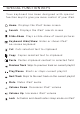


6. P u sh t h e pa ir bu tt on o n t he k e yb oa rd a n d wa tc h
for the LED light to flash blue.
7. If you see ZAGGkeys MINI 9 listed as an “available
device,” select it.
8. Your keyboard should now be pair ed.
9. I f y our iP ad giv es yo u a n e rr o r m es s ag e , r ep e at
process again.
10. If y ou s t ill c an’t get y our k eyb o ard t o pa i r, i t is
possible your iPad needs to have its software updated
To u p da te yo ur iP ad so ft w ar e, fo ll o w th e se s t ep s:
A. Plug your iPad into you r com p u ter
B. Open iTun e s
C. Sele c t yo u r iP a d in the l eft h and colu m n
D. Choose the button in the middl e o f t h e s creen to
che c k fo r sof t ware upd a t es
E. If an update is available, please install it. This will
tak e a f e w mi n utes to d o wnl o a d f r om A p ple® .
F. After installation is complete, repeat troubleshooting
pro c ess.