
Operation Manual


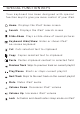


What to do if the iPad does not respond to the
keyboard.
A few things can cause this problem:
-Dead battery
-Need to pair the keyboard to the iPad again
-Problem with the keyboard
Please follow the steps below to find out the problem
and appropriate solution.
1. R e st ar t yo ur i Pa d by ho ld in g do wn t he h om e an d
power button simultaneously until it resets. Let go
of the buttons when you see the Apple® logo.
2. T u r n t h e k e y b o a r d o , a n d t h e n b a c k o n . Y o u
sh ou ld s ee t he L ED l i gh t sh i ne red br iefly . I f no t ,
charge your keyboard.
3. After charging, turn the keyboard on. If the LED light
does not illuminate for a few seconds and then go dim, you
may have a problem with it. Please contact customer
support at ZAGG.com to resolve this problem.
4. On the iPad, Select: Settings > General > Bluetooth > On.
5. If you see ZAGGkeys MINI 9 listed as an “available
device” on your iPad, click on the arrow to the right
and c h o ose to h ave you r iPad “ f o r get th e d evice. ”
TROUBLESHOOTING