
User's Guide

71
Google Maps Operations
● View Current Location: From the Maps app, tap .
● Explore Nearby: From the Maps app, tap Explore and then tap a category to view nearby
things.
● Check Route to Destination: From the Maps app, tap , enter your current location and your
destination.
Route candidates appear in a list.
● Check Detailed Operation for Maps: From the Maps app, tap Menu > Help.
Calculator
Your tablet’s convenient built-in calculator lets you perform basic mathematical equations.
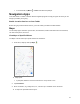
1. From home, swipe up and tap Calculator .
The calculator app launches.
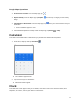
2. Tap onscreen keys for calculations.
Calculation results appear.
Clock
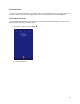
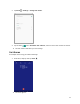
Your tablet has a clock app that lets you set alarms, view time in time zones around the world, use a
stopwatch, set a timer, and use your tablet as a desk clock.