
User guide

1-18
IM 04L41B01-01E
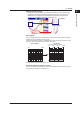
• Auto Span Display (Release number 3 or later)
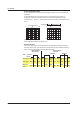
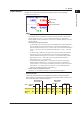
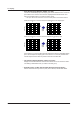
The DX can automatically adjust the display span of the selected channel.
*
It sets the
span based on the maximum and minimum displayed historical data values. This
setting is deactivated when you switch to another group.
* Auto span affects channels that are in the same scale position as the selected channel.
When the maximum or minimum values are outside of the set display span
00
Time axis
Time axis
Auto
span
When the maximum or minimum values are within the set display span
00
Time axis
Time axis
Auto
span
If the maximum or minimum data value falls outside the maximum selectable display
span, the DX adjusts the display span to the maximum or minimum possible value.
The DX responds in the same way when it encounters overow data.
• Top Channel Display (Release number 3 or later)
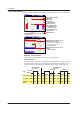
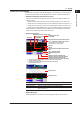
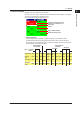
Displays the selected channel’s historical trend waveform in front of all of the others.
This setting is deactivated when you switch to another group.
• Signature (Only on DXs with the /AS1 advanced security option)
See the Advanced Security Function (/AS1) User’s Manual, IM 04L41B01-05EN.
1.3 Display