
User guide

5-28
IM 04L41B01-01E
5.16 Writing a Message When the DX Recovers
from a Power Failure
A message is written to the trend display when the DX recovers from a power failure
while memory sampling is in progress.
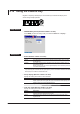
Setup Screen
• Power-fail message
Press MENU (to switch to setting mode), hold down FUNC for 3 s (to switch to basic
setting mode), and select the Environment tab > View, Message.
Setup Items
• Message > Power-fail message
Settings Description
On A message is written when the DX recovers from a power failure while memory
sampling is in progress.
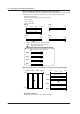
Display example: 15:12 Power Off 2005/10/25 15:12:57
Off Disables the function.
If you are using the multi batch function (/BT2 option), see the DX1000/DX1000N/DX2000 Multi
Batch (/BT2) User
’s Manual, IM04L41B01-03E.