
Installation Instructions



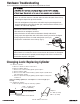

Table Of Contents

P/N YRL-PBINSTL-FUL Rev F
15
Registration required*
Wrong Code Entry Limit
5 Times
One Touch Locking
Enabled
Inside Indicator Light
Disabled (Off)
Factory Settings
Resetting Lock to Factory Default
Settings
Factory Setting
Master PIN Code
Automatic Re-lock
Disabled
Audio Mode
Enabled
Automatic Re-lock Time
30 Seconds
Shutdown Time 60 Seconds
*The Master PIN code must be registered prior to any other programming of the lock.
Privacy Button Setting
Disabled
Lockout Mode
Disabled
Interior Escutcheon
Reset
Button
1. Remove the battery cover and batteries.
2. Remove the interior escutcheon to access the
reset button.
3. The reset button (see image at right) is located
beside the PCB cable connector.
4. While pressing the reset button (minimum of 3
seconds) reinstall batteries. Release reset button.
5. Replace battery cover.
Upon reset, Master PIN Code creation is the only
option available and must be performed prior to any
other programming of the lock.
When lock is reset to factory defaults all user codes
(including the Master PIN code*) are deleted and all
programming features are reset to original default
settings (see below).