
User's Manual



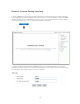


Table Of Contents
- WHLIP229_FCCID_UserManual.pdf
- FCC Warning.pdf
- _
- FCC Warning
- _
- This device complies with Part 15 of the FCC Rules. Operation is subject to the following two conditions:
- (1) this device may not cause harmful interference, and (2) this device must accept any interference received, including interference that may cause undesired operation.
- _
- NOTE 1: Any changes or modifications to this unit not expressly approved by the party responsible for compliance could void the user's authority to operate the equipment.
- _
- This device must be installed to provide a separation distance of at least 20 cm from all persons
- and must not be collocated or operating in conjunction with any other antenna or transmitter.
- _
- _
- _

18
Network Camera Setting Interface
1. Click on settings from the home page. When connecting the camera for the first time or after resetting it to
its default settings, the setup interface start page below will load. It is recommend that you change the admin
password in order to avoid unauthorized access to the camera. To do this follow the instructions by clicking
on the underlined link “here” to access administrator password editing page.
2. Type the password in both fields then click Save. Please take note of the password. If you forget the
password, the camera will have to be reset to its default settings in order to gain access to the settings page
and this will also reset all other settings you may have changed.