
User's Manual


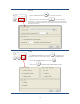



Table Of Contents
- WHLIP229_FCCID_UserManual.pdf
- FCC Warning.pdf
- _
- FCC Warning
- _
- This device complies with Part 15 of the FCC Rules. Operation is subject to the following two conditions:
- (1) this device may not cause harmful interference, and (2) this device must accept any interference received, including interference that may cause undesired operation.
- _
- NOTE 1: Any changes or modifications to this unit not expressly approved by the party responsible for compliance could void the user's authority to operate the equipment.
- _
- This device must be installed to provide a separation distance of at least 20 cm from all persons
- and must not be collocated or operating in conjunction with any other antenna or transmitter.
- _
- _
- _

16
[Record]
1. Press the Record button to record video and audio.
2. Recording Config. Click this button to set the recording
parameters, you can set record path, video file size and select whether to
start recording automatically when motion is detected and the length of the
recording in seconds.
[Tools]
1. For Full Screen mode click this button , Press Esc to exit.
It could also achieve same function by double click the Image Field.
2. For Fill up the Image field click this button .
3. This button for Stream Type, Video Codec Settings.