
User's Manual




4
Main Screen Introduction
Long pressing the power key for 5 seconds, TABLET will enter the unlocking
interface after displaying the startup picture.
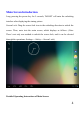
Screen Lock: Drag the screen lock icon to the unlocking direction to unlock the
screen. Then, enter into the main screen, which displays as follows: (Note:
There’s not only one method to unlock the screen lock, and it can be selected
through the operations: Settings----Safety----Screen Lock).
Detailed Operating Instructions of Main Screen: