
User's Manual




2
devices and external devices, such as mouse, USB flash disks, and
OTG wires. At the same time, this interface is also the charger
interface.
TF Card Slot: Externally connect the TF card.
Basic Operations
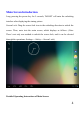
Startup/Shutdown
In status of power-off, after long press the power key for 5 seconds, it will enter
into the main screen after displaying the startup picture.
In status of power-on, after long press the power key for 5 seconds, it will pop
up the dialogue box, and select “OK” key to shutdown, and the “Cancel” key to
keep the power-on state.
PC Connection
In status of power-on, after connecting with the computer using USB, select the
connection method of “Media Transfer Protocol (MTP)” to achieve the
removable disk function, which can upload and download data such as
documents, etc.
Notes: MTP is a part of Windows Media framework, therefore it closely connect