
User's Manual




1
Appearance Description
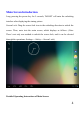
Function Description of Keys and Interfaces
Volume+/Volume-: Short press the button to turn up/down the volume.
Power Key:Long press it for 5 seconds to startup/shutdown; short press to lock
the screen, and wake it up by short press again.
Charge/USB interface: Used for connecting the computer, data transmission
Front-facingCam era
Vo l u m e +
Vo l u m e _ -
PowerKey
Rear Camera
TF Card Slot
Loud Speaker
EarphoneAperture
Microphone
HDMI
Micro USB