All in One Printer User Manual
Manuals
Brands
Xerox Manuals
All in One Printer
WorkCentre Pro 555
281
282
283
284
285
286
287
288
289
290
C-1
8
Wor
kCe
ntre
Pro 5
55/
575
Replacing the ADF Re
t
ard Pad
Note:
The ADF retard
pad is incl
uded i
n the Drum
Cartrid
ge Ki
t.
Follow the
instruc
tions
below to r
eplace t
he ADF r
etard pad.
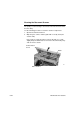
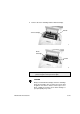
1.
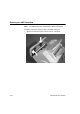
Open the
Control P
anel Co
ver
and locat
e the r
etard pad.
1
...
...
280
281
282
283
284
...
...
327