
Administrator's Guide




Contents
8 WorkCentre 5845/5855/5865/5875/5890 Multifunction Printer
System Administrator Guide
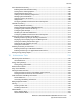
Email ........................................................................................................................................................................ 158
Workflow Scanning .................................................................................................................................................... 163
Enabling Workflow Scanning .......................................................................................................................... 163
Configuring File Repository Settings ........................................................................................................... 163
Configuring the Default Template ............................................................................................................... 168
Configuring a Template to Create a Password-Protected PDF .......................................................... 170
Configuring Workflow Scanning General Settings ................................................................................. 170
Setting Scanned Image File Naming Conventions ................................................................................ 171
Configuring Custom File Naming ................................................................................................................. 172
Configuring Template Pool Repository Settings ..................................................................................... 172
Updating the List of Templates at the Control Panel ........................................................................... 173
Setting Template Display Settings for the Control Panel .................................................................... 173
Configuring a Validation Server .................................................................................................................... 173
Scan to USB................................................................................................................................................................... 174
Enabling Scan to USB ........................................................................................................................................ 174
Scanning to a User Home Folder .......................................................................................................................... 175
Configuring the Printer for the Xerox Scan Utility ......................................................................................... 177
Enabling Remote Scanning using TWAIN ......................................................................................................... 178
Configuring Scan To Destination .......................................................................................................................... 179
Before You Begin................................................................................................................................................. 179
Configuring Default Scan Settings ............................................................................................................... 179
Setting the Default Scan To View to Favorites ........................................................................................ 179
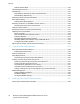
8 Faxing 181
Fax Overview ................................................................................................................................................................ 182
Fax .................................................................................................................................................................................... 183
Configuring Required Fax Settings...............................................................................................................
183
Configuring Address Book Settings .............................................................................................................. 184
Fax Security ........................................................................................................................................................... 185
Setting Fax Defaults .......................................................................................................................................... 185
Setting Fax Feature Defaults.......................................................................................................................... 188
Fax Forwarding .................................................................................................................................................... 188
Fax Polling.............................................................................................................................................................. 190
Fax Mailboxes ...................................................................................................................................................... 191
Fax Reports ............................................................................................................................................................ 191
Internet Fax .................................................................................................................................................................. 198
Accessing the Internet Fax Setup Page ...................................................................................................... 198
Configuring Required Settings ....................................................................................................................... 198
Configuring General Internet Fax Settings ............................................................................................... 198
Configuring Internet Fax Receive Settings ............................................................................................... 199
Configuring Address Book Settings .............................................................................................................. 199
Configuring Default Internet Fax Settings ............................................................................................... 200
Setting File Compression Options ................................................................................................................. 200
Configuring Internet Fax Security Settings .............................................................................................. 200
LAN Fax .......................................................................................................................................................................... 201
9 Accounting 203