
Operation Manual




System Setup
Xerox WorkCentre 3550
User Guide
150
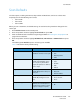
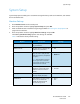
The following Paper Settings options and settings are available:
Note: * indicates the factory default setting.
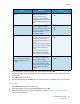
Option Description Settings
Paper Size Sets the size of paper in the
tray.
•Tray 1
•Tray 2
•A4 or Letter *
•Legal
•A5
•B5
•Folio
•Oficio
•Executive
• Bypass Tray •A4 or Letter *
•Legal
•A5
•A6
•B5
•Folio
•Oficio
•Executive
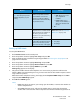
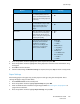
Paper Type Sets the type of paper in the
tray.
•Tray 1
•Tray 2
•Plain Paper *
•Recycled
•Thick
•Thin
•Archive
• Bypass Tray •Plain Paper *
•Bond
• Transparency
•Envelope
•Labels
•Cardstock
•Preprinted
•Recycled
• Color Paper
•Thick
•Thin
•Archive
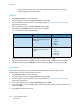
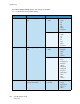
Paper Source Sets the paper tray to be used
for Copy and Fax jobs.
•Copy Tray
•Fax Tray
•Tray 1
•Tray 2
• Bypass Tray
•Tray 1 / 2
•Auto *