
Operation Manual





Machine Status Menu
Xerox WorkCentre 3550
User Guide
131
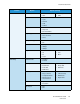
E-mail Defaults File Format •PDF
•TIFF
•Multi-Page TIFF
•JPEG
Lighten/Darken • Lightest
• Light
•Normal
•Dark
•Darkest
Output Color • Color
•Grayscale
•Black and White
Original Type •Text
• Photo and Text
•Photo
Background Suppression •Off
•On
Resolution • 300 dpi
• 200 dpi
• 100 dpi
Original Size •Letter / A4
•A5
•B5
•Legal
•Executive
•Folio
•Oficio
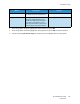
Fax Setup Enable/Disable •Disabled
•Enabled
Sending •Redial Times
•Redial Term
•Prefix Dial
•ECM Mode
•Send Report
•Image TCR
•Dial Mode
Receiving • Receive Mode
•Ring to Answer
• Stamp RCV Name
•RCV Start Code
•Auto Reduction
•Discard Size
•Junk Fax Setup
•DRPD Mode
•Duplex Print
Defaults • Lighten/Darken
•Resolution
Auto Report
•On *
•Off
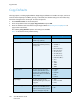
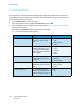
Feature Option Option Settings