
Printer User Manual





Troubleshooting
WorkCentre 6400 Multifunction Printer
User Guide
192
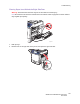
3. Carefully remove the jammed media.
4. Close the right side door.
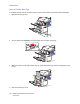
Clearing a Paper Jam Behind the Control Panel
1. Open the front door and raise the control panel.
2. Carefully remove any jammed media.
3. Lower the control panel and close the front door.
6400
-
105
6
4
00
-1
06
6400-170