
User manual





Troubleshooting
69 Version 1.5
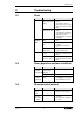
SYMPTOM
POSSIBLE CAUSE
SOLUTION
wrong gamma
setting
- check gamma setting in the
on-screen menu (Color set-
tings)
no color
(black/white)
bad wiring to the
display device
- check wiring
wrong display set-
tings
- check display settings
Unit is set to
black/white
- check on-screen menu set-
tings (Color Settings)
flickering
image
room lights are
fluorescent lamps
- check shutter settings in the
on-screen menu (Exposure
Settings)
low refresh rate
with CRT-display
device
- increase refresh rate
wrong display de-
vice settings
- check display settings
bad wiring to the
display device
- check wiring
15.5 Connections
SYMPTOM
POSSIBLE CAUSE
SOLUTION
USB port
connect computer
to the unit and start
USB-software
- check wiring to the computer
- check driver installation
- check USB port of the com-
puter
LAN / Ether-
net port
connect computer
to the unit, start
Internet browser
and input the IP-
address of the unit
- check wiring to the computer
- check kind of wiring (crossed
or straight)
- check Ethernet Settings of
the unit
- check Ethernet port of the
computer
- check security settings
Serial port
connect computer
to the unit and start
Hyper Terminal (or
similar) and press
"v" to check com-
munication
- check wiring (Null modem)
- check serial port settings in
the on-screen extra menu
- check serial port of the com-
puter