
User manual






OSD
49 Version 1.5
Returns to previous menu page.
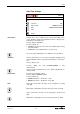
Recall Default Settings
SCB-12
AUTO PRESET
Are you sure?
Ok
Cancel
Select YES to reset all Settings to factory default. Settings regard-
ing output and communication are not affected (like resolution, IR
code, baudrate, IP address).
For resetting just the selected item in the OSD, keep the MEMORY
5 key pressed for 4 seconds.
In case the connected display does not show an image set the unit
back to the factory default by keeping pressed simultaneously both
FOCUS keys on the unit (#23) and the Number 4 key (back-arrow,
#18) on the remote control.
To change the resolution without entering the on-screen menu just
keeping pressed simultaneously both FOCUS keys on the unit
(#23) and select the desired setting:
• MEMORY 5 on the remote control: Resolution AUTO
• MEMORY 2 on the remote control: Resolution UP (when select-
ed AUTO before, the next setting is VGA/60Hz)
• MEMORY 8 on the remote control: Resolution DOWN
Return