
User manual






OSD
Version 1.5 48
Date/Time Settings
SCB-12
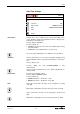
DATE / TIME SETTINGS
Time Source
INTERNAL
Timezone
UTC
Date Format
DDMMYYYY/24H
Date
FROM DHCP-SERVER
Time
Return
Select if time is in free running mode or synchronized with a time-
server. Daylight saving time/standard time will be changed auto-
matically by selected timezone.
Factory setting is INTERNAL
Possible settings are:
• INTERNAL: internal clock are used, time and date will be lost by
power interruption.
• EXTERNAL: enter valid IP-address of a time server
Ask your network administrator for a valid time server IP-address.
Select local timezone for correct time calculation. Daylight saving
time/standard time will be changed automatically by selected time-
zone.
Factory setting is UTC
Possible settings are from EUROPE/LONDON to Afri-
ca/Casablanca
Ask your network administrator for more details regarding the in-
stalled network.
Select the preferred time format.
Factory setting is DDMMYYYY/24H
Possible settings are:
• DDMMYYYY/24H: i.e. 22.05.2011 / 19:53
• MMDDYYYY/12H: i.e. 05/22/2011 / 07:53 PM
Shows the current date. The date can be changed by selecting
each digit.
Manual date setting will be lost after removing of mains (no RTC).
Shows current time. The time can be changed by selecting each
digit.
Manual time setting will be lost after removing of mains (no RTC).
Time Source
Timezone
Date Format
Date
Time