
User manual


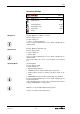




OSD
Version 1.5 46
Security Settings
SCB-12
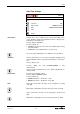
SECURITY SETTINGS
Admin Password
**********
Guest Password
Password
Ethernet-Mode
FW+CTRL+IMG
Return
To prevent un-authorized access.
Admin password has to be entered before any changes are possi-
ble.
Factory setting is Password
• Possible characters are: 0-9, a-z and A-Z
• 10 digits
Write down the passwords and keep it securely. If you forgot the
password or lost it, the access through the Ethernet/LAN port may
be denied.
Contact your WolfVision dealer in such case www.wolfvision.com
To prevent un-authorized access.
Admin password has to be entered before any changes are possi-
ble.
Factory setting is Password
• Possible characters are: 0-9, a-z and A-Z
• 10 digits
Write down the passwords and keep it securely. If you forgot the
password or lost it, the access through the Ethernet/LAN port may
be denied.
Contact your WolfVision dealer in such case www.wolfvision.com
To change the behavior of accessibility to the unit via the network.
Factory setting is FW+CTRL+IMG
Possible settings are:
• FW+CTRL+IMG: Ethernet connection can be used un-restricted
• AUTH: Ethernet connection depending on authentication
admin has full access (FW+CTRL+IMG)
guest has restricted access (IMG)
• OFF: firmware updates, controls and image transfers are prohib-
ited
• IMG ONLY: firmware updates and controls are prohibited.
Ethernet connection can be used for image transfers only
• CTRL ONLY: firmware updates and image transfers are prohib-
ited. Ethernet connection can be used for control purposes only
• CTRL+IMG: firmware updates are prohibited. Ethernet connec-
tion can be used for controls and image transfers only
• FW ONLY: controls and image transfers are prohibited. Ethernet
connection can be used for firmware updates only
Admin Password
Guest Password
Ethernet-Mode