
User manual






OSD
Version 1.5 44
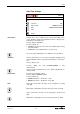
Streaming Settings
SCB-12
MULTICAST SETTINGS
Multicast IP
232.
1.
1.
1.
Multicast Port
8800
Streaming Mode
AUTO
Streaming Format
VGA
Frame Rate
LOW
Return
Changes Multicast IP address of camera.
Factory setting is 232.1.1.1
Possible settings are:
• 225.1.1.1 to 238.255.255.255
Ask your network administrator for more details regarding the in-
stalled network.
Changes Multicast destination port.
Factory setting is 8800
Possible settings are:
• 8800 to 9000.
Ask your network administrator for more details regarding the in-
stalled network.
The corresponding source port is one port higher as the multicast
port.
Streaming Mode
Factory setting is AUTO
Possible settings are:
• OFF: Streaming disabled.
• UNICAST: Camera streams permanently using unicast.
• AUTO: Camera streams on demand, only when clients are lis-
tening
• CONTINUOUS: Camera streams permanently using multicast.
Ask your network administrator for more details regarding the al-
lowed network traffic.
Some Streaming players cannot listen on demand and needs the
settings "CONTINUOUS" for proper work.
Multicast: one stream with multiple listening devices
Unicast: one stream each listening device.
Multicast IP
Multicast Port
Streaming Mode