
User manual


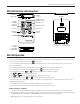


DigiWave 300 Series Digital Transceiver and Receiver
6
QUICK GROUP CHANGE / SETUP BUTTONS
· Press and hold and together for 3 seconds to enter setup menu
· Press and hold button for 3 seconds to enter quick group change mode. The GRP light will ash. Then use
or to change groups. To exit, push again or just wait until the unit times out.
· Use these buttons to select channels in simultaneous interpretation mode
MICROPHONE LEVEL ADJUSTMENT
· Hold the
button for two seconds to enter mic level adjustment. For level adjustment use or
LINE LEVEL ADJUSTMENT
· Hold the
button for two seconds to enter mic level adjustment. For level adjustment use or
TONE ADJUSTMENT
· Press and hold the – and + buttons simultaneously for 2 seconds. The LCD will display the last tone setting t: (1 - 9).
· Using the -/+ buttons , adjust the tone up or down: 1 = Most bass 5 = Flat (Default) 9 = Most treble
· Press and hold the – and + buttons simultaneously for two seconds to save the tone setting.
VOLUME CONTROL / SELECT BUTTON
· Control / Volume
· Use to navigate selections in setup menu.
· Access and adjust tone control (0-53)
TALK BUTTON
· Press button momentarily once to activate the microphone. Press button once more to turn o the microphone
· Press and hold the button for approximately 2 seconds to mute other DLT 300 Guest units. Only the M1 and M2 have this
function.
([TALK] LED will blink on all units when in mute mode).
Battery Charging – DLT 300
1. This Product uses an internal rechargeable Lithium Polymer battery.
2. Use the 30 Pin connector, located on the bottom of DLT 300 to charge the battery. Full charging time is approximately
12 hours. The Red LED ashes while charging. The Green LED will be on steady when the battery is charged.
3. Battery Maintenance - Charge the battery at room temperature.