
User manual




DigiWave 300 Series Digital Transceiver and Receiver
5
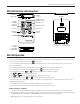
DLT 300 Controls and Connectors
INTERNAL SPEAKER
LCD DISPLAY
LED INDICATORS
TALK BUTTON
WITH BRAILLE DOT
VOLUME / SELECT UP
VOLUME / SELECT DOWN
POWER / MENU
HEADPHONE
JACK 3.5 MM
MIC JACK 3.5 MM
INTERNAL
MICROPHONE
30-PIN DOCKING/
CHARGING CONNECTOR
DLT 300 Operation
BUTTON FUNCTIONS
POWER / MENU BUTTON
· Press and hold for power On/O
· Press once to change section when in setup menu
· Review setup (push repeatedly to advance to next setting)
· Attendance checking can only be done with a Master unit. Must have address assigned between 1 — 99 to allow
attendance checking function. To check attendance, push and release the
button and the number of attendees
will be displayed for 2 seconds.