
User manual




DigiWave 300 Series Digital Transceiver and Receiver
22
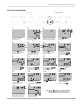
Example 4: Repeater Mode
An additional DLT 300 can be set-up as a repeater to increase the range of each channel. To use Repeater Mode, rst get the
System set up using instructions under Example 2 for Simultaneous Interpretation. Then set up the repeater units as shown here.
When repeater mode is used, the Repeater is congured as the Master, and all units sync to this Master Repeater. The main
speaker’s DLT must be recongured as a Guest unit.
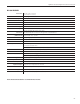
1-way
Speak Only
(Main Speaker)
1-way
Receive / Speak
(Interpreter)
2-way
Receive Only
1-way
Repeater
1-way
Receive Only
2-way
Intercom
2-way
(Tour Guide)
1-way Modes
2-way Modes
REPEATER MODE SETUP
Interpreter
Repeater DLTs
Interpreter
DLTs
Main Speaker (Floor)
Repeater DLT
Main Speaker (Floor)
DLT
Must be set to 1-way
Talk Only mode, GUEST,
GROUP 0-1023. The
unit will default to CH 0.
This is the main speaker
(oor)’s unit.
Must be set to 1-way
Repeater mode, MASTER,
GROUP 0-1023. The unit
will default to CH 0. NOTE:
For more than one repeater,
repeaters on additional
channels must be GUEST.
Must be set to 1-way
Interpreter mode,
GROUP 0-1023,
GUEST. The unit will
default to CH 1.
Must be set to 1-way
Repeater mode, GROUP
0-1023, and GUEST. Unit
will default to CH 1.