www.tourguidesystem.co.uk Digi-Wave™ 300 Series DLT 300 Digital Transceiver and DLR 360 Digital Receiver USER MANUAL DLT 300 DLR 360 The Digi-Wave 300 Series is not backward compatible with previous Digi-Wave transceivers or receivers.
DigiWave 300 Series Digital Transceiver and Receiver Digi-Wave™ 300 Series DLT 300 Digital Transceiver and DLR 360 Digital Receiver Contents Safety Warnings and Recycling Instructions............................................................................................................................. 3 System Overview.....................................................................................................................................................................
DigiWave 300 Series Digital Transceiver and Receiver Safety Warnings and Recycling Instructions HEARING SAFETY CAUTION! This product is designed to amplify sounds to a high volume level which could potentially cause hearing damage if used improperly.
DigiWave 300 Series Digital Transceiver and Receiver System Overview The Digi-wave™ system is a patented, digital spread-spectrum (DSS), simultaneous two-way wireless listening system operating in the 2.4 GHz band. Due to it’s frequency-hopping algorithm, it avoids interference and is a very secure method of communication.
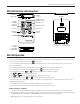
DigiWave 300 Series Digital Transceiver and Receiver DLT 300 Controls and Connectors INTERNAL SPEAKER LCD DISPLAY LED INDICATORS TALK BUTTON WITH BRAILLE DOT VOLUME / SELECT UP VOLUME / SELECT DOWN POWER / MENU HEADPHONE JACK 3.5 MM MIC JACK 3.
DigiWave 300 Series Digital Transceiver and Receiver QUICK GROUP CHANGE / SETUP BUTTONS · Press and hold and together for 3 seconds to enter setup menu · Press and hold button for 3 seconds to enter quick group change mode. The GRP light will flash. Then use or to change groups. To exit, push again or just wait until the unit times out.
DigiWave 300 Series Digital Transceiver and Receiver 30-PIN DOCKING/ CHARGING CONNECTOR DLR 360 Controls and Connectors HEADPHONE JACK 3.5 MM LANYARD SLOT SPEAKER STRENGTH DLT#1 STRENGTH DLT#2 ANTENNA SYMBOL NUMERIC TYPE BATTERY STRENGTH NUMERIC DISPLAY RED LED GREEN LED VOLUME ADJUST CH/GROUP CHANGE POWER BATTERY TYPE BATTERY SWITCH COMPARTMENT 30-PIN DOCKING/ CHARGING CONNECTOR SPEAKER DLR 360 Operation 1. Insert 2 AAA batteries into the DLR. Observe correct polarity.
DigiWave 300 Series Digital Transceiver and Receiver Getting Started: Preprogrammed Systems If a system has been purchased, you should not need to perform any programming. The system will have been configured to your order. Turn Master 1 on first so other units can pair. Guest units will turn off after 5 minutes if they cannot find a master. 1. Charge all DLTs. If using DLRs, either charge them with NiMH batteries or insert fresh Alkaline batteries.
DigiWave 300 Series Digital Transceiver and Receiver Before Programming the Digi-Wave™ System Depending upon the mode chosen, up to six people can talk in a group at any given time. The M1 will have first priority, M2 has second priority and Guest units have third priority. When two or more people are talking in a group, the participants can hear their voices with the DLTs or DLRs. The M1 and M2 have the ability to lock out other talkers by holding down the TALK button for three seconds.
DigiWave 300 Series Digital Transceiver and Receiver Rules of Operation (1-way modes) The following rules must be followed when setting up any Digi-Wave™ system. Failure to adhere to these rules will result in unpredictable, unsupported operation. • Up to 15 channels can be used simultaneously, i.e. one floor and 14 interpreters. • There must be one Master 1 (usually this is also the floor), and only one, per group. • Each Interpreter must be assigned their own channel number.
DigiWave 300 Series Digital Transceiver and Receiver Programming the Digi-Wave™ System for 1-way Modes There are 4 basic steps to programming a Digi-wave system: 1. Set Mode: 2-way or 1-way 2. Set Priority: Master 1, Master 2, and Guest 3. Set Channel 4. Set Group Number Most of the programming is done on the DLT(s); the receivers just need to be assigned the correct group number. The Master 1 should be programmed first - all other units synchronize with the Master 1. Step 1. Set Mode: 1-way a.
DigiWave 300 Series Digital Transceiver and Receiver Programming the Digi-Wave™ System for 2-way Modes There are 4 basic steps to programming a Digi-wave system: 1. Set Mode: 2-way or 1-way 2. Set Priority: Master 1, Master 2, and Guest 3. Set Address 4. Set Group Number Most of the programming is done on the DLT(s); the receivers just need to be assigned the correct group number. The Master 1 should be programmed first - all other units sychronize with the Master 1. Step 1.
DigiWave 300 Series Digital Transceiver and Receiver Programming the Digi-Wave™ System: DLT Optional Settings Secure Key Code: When a group has been set up and the same Secure Code has been entered into all the DLTs, the DLTs without this Secure Code entered cannot listen in on the group. This may be desirable in private or high security-level functions. The same four digit code must be programmed into all of the DLTs, Master 1, Master 2 and Guests.
DigiWave 300 Series Digital Transceiver and Receiver Address Confirmation Press MENU three times for M1 and M2, or twice for GST units. The address for the DLT will be displayed for two seconds. NOTE: Every DLT MUST have its own address and all must be assigned to the same group. Quick Group Change “Groups” apply to 2-way Mode only. 1. With the DLT powered ON, push and hold the Group button until the GROUP indicator on the screen starts blinking and the light above the Group button comes on (Figure 5).
DigiWave 300 Series Digital Transceiver and Receiver Example 1: 2-way Mode, Tour Guide HOW IT WORKS 1. Tour Guide 1 speaks, using a DLT alone (built-in mic) or using it with a compatible headset mic. 2. Each Tour Group Member and Tour Guide 2 listen directly to Tour Guide 1, each using a DLT alone (built-in speaker) or using it with a compatible headset mic. 3. Tour Guide 2 then speaks, using a DLT alone (built-in mic) or using it with a compatible headset mic. 4.
DigiWave 300 Series Digital Transceiver and Receiver TOUR GROUP TOUR GUIDE 1 TOUR GUIDE 2 2-WAY 2-WAY Tour Guide 1 Unit Tour Guide 2 Unit Tour Group Member Units 2-WAY SETUP FOR TOUR GUIDE OPERATION 1-way Modes 1-way Speak Only (Main Speaker) 16 1-way Receive / Speak (Interpreter) 1-way Repeater 2-way Modes 1-way Receive Only 2-way Intercom 2-way (Tour Guide) 2-way Receive Only
DigiWave 300 Series Digital Transceiver and Receiver 1 2 3 4 Press and hold POWER button for 2 seconds to turn DLT ON Press and Hold and for 3 seconds to enter programming mode. The other icons will disappear and the current mode icon will be blinking on the screen. Use the buttons to change to 2-way Tour Guide mode. 5 6 Press the button to select this mode and move to the next setting. Use the buttons to select Master 1 (first unit only). There must be only one Master 1 per group.
DigiWave 300 Series Digital Transceiver and Receiver Example 2: Simultaneous Interpretation (1-way) HOW IT WORKS 1. The Main Speaker will use channel 0; Press the TALK button to activate the microphone 2. Each Interpreter unit will need to be assigned a channel number (1-14). The TALK button must be activated to send the interpretation to the attendees. 3. The floor speaks, using a DLT alone (built-in mic) or using it with a compatible headset mic. 4.
DigiWave 300 Series Digital Transceiver and Receiver 1-WAY SETUP FOR SIMULTANEOUS INTERPRETATION 1-way Modes 1-way Speak Only (Main Speaker) 1-way Receive / Speak (Interpreter) 1-way Repeater 2-way Modes 1-way Receive Only 2-way Intercom 2-way (Tour Guide) 2-way Receive Only 1 2 3 4 Press and hold POWER button for 2 seconds to turn DLT ON. Press and Hold and for 3 seconds to enter programming mode. The other icons will disappear and the current mode icon will be blinking on the screen.
How it Works: 6-way Intercom DigiWave 300 Series Digital Transceiver and Receiver Example 3: Intercom (2, 3, 4, 5 or 6 simultaneous talkers) HOW IT WORKS 1. There must be one primary “Master 1” unit per group (for synchronization). 2. Each secondary unit is set up as a “Guest”. 3. Up to six people can talk, and listen to each other, at the same time (6 Live mics). 4. In order to use this feature to it’s fullest, all units are programmed to be PnL, where the TALK button stays latched ON. 5.
DigiWave 300 Series Digital Transceiver and Receiver 2-WAY SETUP FOR INTERCOM 1-way Modes 1-way Speak Only (Main Speaker) 1-way Receive / Speak (Interpreter) 1-way Repeater 2-way Modes 1-way Receive Only 2-way Intercom 2-way (Tour Guide) 2-way Receive Only 1 2 3 4 Press and hold POWER button for 2 seconds to turn DLT ON Press and Hold and for 3 seconds to enter programming mode. The other icons will disappear and the current mode icon will be blinking on the screen.
DigiWave 300 Series Digital Transceiver and Receiver Example 4: Repeater Mode An additional DLT 300 can be set-up as a repeater to increase the range of each channel. To use Repeater Mode, first get the System set up using instructions under Example 2 for Simultaneous Interpretation. Then set up the repeater units as shown here. When repeater mode is used, the Repeater is configured as the Master, and all units sync to this Master Repeater. The main speaker’s DLT must be reconfigured as a Guest unit.
DigiWave 300 Series Digital Transceiver and Receiver Any DLT’s in 1-way Modes, or DLR’s, must be in the same Group. Each Listener would select a desired channel/language. See below - when repeater mode is used, the main speaker’s unit is reconfigured as a Guest unit. The Repeater is configured as the Master unit. DLT 300’s FOR FLOOR AND INTERPRETERS CH 0 Main speaker (floor) CH 1 CH 2 CH 3... CH 14 GUEST CH 0 CH 1 MASTER CH 0 CH 2 CH 3... CH 14 GUEST REPEATERS CH 1 CH 2 CH 3...
DigiWave 300 Series Digital Transceiver and Receiver Differences between DLT 300, DLT 100 2.0 and DLT 100 Function/Description DLT 300 DLT 100 2.
DigiWave 300 Series Digital Transceiver and Receiver Differences between DLR 360, DLR 60 2.0 and DLR 60 Between 08/13 and 11/13, a limited number of DLR 60’s were manufactured and sold to the marketplace. If the front of the unit says “Digi·WAVE”, you have a DLR 60. If it says “DIGI·WAVE 2.0”, you have a DLR 60 2.0. Most units are the DLR 60 2.0, so this section may not apply to your product. Function/Description DLR 360 DLR 60 2.
DigiWave 300 Series Digital Transceiver and Receiver Specifications DLT 300 TRANSCEIVER Dimensions Weight Color Case Material Battery type Battery life 103.3 x 61.8 x 11.3 mm (4.07 x 2.43 x 0.44 inches) (H x W x D) 82 g (2.
DigiWave 300 Series Digital Transceiver and Receiver DLR 360 RECEIVER Dimensions: 2.36” W x 3.54” H x 0.63” D (60 mm x 90 mm x 16 mm) Weight: 1.7 oz. (47g) without batteries. Frequency Band: 2.
DigiWave 300 Series Digital Transceiver and Receiver Troubleshooting PROBLEM CAUSE WHAT TO DO Power does not turn-on Dead battery Charge the battery, replace battery Power turned off automatically Master device can’t be found Turn on Master unit Power doesn’t turn off Program Error Press reset button on the back of device (DLT only) Disconnection of headphone Check headphone connection Master unit shut off Turn on / set master Different Group Number settings Set every unit to the same grou
DigiWave 300 Series Digital Transceiver and Receiver FAQs What is the range of the system? Up to 100 ft outdoors and up to 200 ft indoors. (The range always depends on the environmental conditions). What is the benefit of this system over the 72 MHz (FM) systems? • DLTs can operate in two way mode. • Team teach/tour guide ability. • Relay feature increases range. • Harmonized frequencies for international use. • Secure communication with encryption and secure code.
DigiWave 300 Series Digital Transceiver and Receiver FCC statements Federal Communication Commission Interference Statement This equipment has been tested and found to comply with the limits for a Class B digital device, pursuant to Part 15 of the FCC Rules. These limits are designed to provide reasonable protection against harmful interference in a residential installation.
DigiWave 300 Series Digital Transceiver and Receiver 2-year Warranty Williams Sound products are engineered, designed, and manufactured under carefully controlled conditions to provide you with many years of reliable service. Williams Sound warrants the DLT 300 and DLR 360 against defects in materials and workmanship under normal use and conditions for 2 years from date of purchase.
10300 Valley View Rd • Eden Prairie, MN 55344 800-328-6190 / 952-943-2252 • FAX: 952-943-2174 www.williamssound.