
User Manual




Cisco High-Density Analog Voice and Fax Network Module
Supported Standards, MIBs, and RFCs
10
Cisco IOS Release 12.2(2)XT and 12.2(8)T
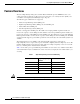
Table 2 lists the hardware platforms that support this feature, and the releases in which the feature was
first supported. If the First T train Release column is blank, the feature is not yet available in a Cisco IOS
T release on that platform.
Table 2 Cisco IOS Release and Platform Support for this Feature
Supported Standards, MIBs, and RFCs
Standards
• No new or modified Standards are supported by this feature.
MIBs
• No new or modified MIBs are supported by this feature.
To obtain lists of supported MIBs by platform and Cisco IOS release, and to download MIB modules,
go to the Cisco MIB website on Cisco.com at the following URL:
http://www.cisco.com/public/sw-center/netmgmt/cmtk/mibs.shtml
RFCs
• No new or modified RFCs are supported by this feature.
Prerequisites
• Obtain analog line or analog trunk service from your PBX, Key System, or PSTN.
• Complete your company’s dial plan.
• Establish a working telephony network based on your company’s dial plan.
• Install at least one other network module or WAN interface card to provide the connection to the
network LAN or WAN.
• Establish a working IP and Frame Relay or ATM network. For more information about configuring
IP, refer to the Cisco IOS IP Configuration Guide, Release 12.2.
• Install appropriate voice processing and voice interface hardware on the router. See the
“Configuring Analog FXO and FXS Voice Ports” section on page 11.
Platform 12.2(2)XT 12.2(8)T
Cisco 2600 series X X
Cisco 3640 X X
Cisco 3660 X X