
MultiRack Setup

!
!
!
21
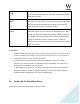
Device Firmware: This column holds an Update button for each I/O or server device. Click the
button to update the device’s firmware if incompatible with the MultiRack version you are using.
The Update process will display a progress bar and status messages. Follow the status
messages and instructions carefully. At the end of the process, reboot the updated devices, let
them boot, then click the window’s Refresh button.
SoundGrid Servers
The Servers table is very similar to the Inventory table and is used in the same way. This table
is separate from the I/O Device table, since servers do not have channels and do not receive
audio connections.
Choose “1” for the server you intend to use as your main processing engine; choose “2” for the
server you intend to use as a redundant server.