
MultiRack Setup

!
!
!
20
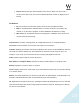
! Device displays the type and description of the device. When you hover with a
mouse over a device row, the device’s software/firmware version is displayed as a
tool-tip.
I/O Devices
! I/O: An I/O device that streams audio to and from the SoundGrid network.
! DRV: A SoundGrid driver installed either on another computer connected to the
network, or on the same computer on which MultiRack SoundGrid is running.
! MR: MultiRack, SoundGrid’s audio processing device. MultiRack is the device that
receives audio for processing.
Control Panel: Contains a setting button for configurable devices, for example DiGiGrid
MGO/MGB. Click the button to access the control panel of each device.
Channel: Displays the number of channels available on the device. I/O and MultiRack channels
cannot be set and are display-only. SoundGrid Driver channels can be set by the user. For
example, if you set 32, your driver will have 32 recording and playback channels.
Name: Double-click this field to rename the device.
MAC address / Computer Name: Displays the device’s MAC address or computer name.
Status: Displays the device’s status in real-time.
Clock: Displays I/O devices’ clock status. Sync OK indicates that the device is synced internally
or to another device.
Master: The Radio button lets you choose the I/O device as Clock Master. (Yamaha WSG-Y16
and Allen & Heath M-Waves cards are automatically set as Clock Master.)
ID: Applicable for I/O-type devices only. Clicking this button will temporarily turn on the selected
I/O’s link and activity LEDs while turning all other I/O devices’ LEDs off, allowing you to identify
the device in the network.