
User's Manual




- 12 -
3 RF module command
RF module can be controlled by AT command, and it is composed in the form of
“AT+<Command>[Enter]”
: [Enter] means newline character, CR(0x0D) + LF(0x0A) character
3.1 Enter command mode
Check whether to enter “Command Mode” for 5 seconds after powering on the RF module.
(When entering “command mode” command is not input, “RF transmit/receive mode” is
automatically switched)
RF module setting can be checked and changed after entering “command mode”
When changing the RF module setting, the changed setting value is applied only after flash
saving is completed. (If Flash cannot be saved, the setting change will not be applied)
After “command mode” is finished, “RF transmission/reception mode (=RF Mode)” is
automatically switched.
Mode switching Input string Remark
RF Module Initial → CMD Mode
AT+SET1[Enter] In “RF transmission
/ reception mode”, can not
enter “command mode”
CMD Mode → RF Mode AT+SET0[Enter]
Table 3. Entering/exiting command mode
3.2 Configuration Command
Basic command
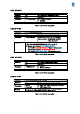
Command Description
AT+I Display module information
AT+F Module frequency band setting
AT+C Calling up default settings related to module control
AT+S Save module current settings flash memory
AT+V Module current setting output
Table 4. Command table