VIZIO VUR8 Universal Remote User Manual Table of Contents 1.1 VIZIO Universal Remote Control ........................................................................................................ 3 1.1.1 Insertion of Batteries in the Remote Control ............................................................................... 5 1.1.2 Remote Control Range................................................................................................................ 6 1.1.
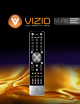
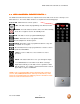
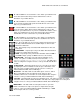
VIZIO VUR8 Universal Remote User Manual 1.1 VIZIO UNIVERSAL REMOTE CONTOL * The VIZIO Universal Remote Control is a comprehensive remote that can be used to control up to four different devices. The remote button functions are explained on the following pages. Remote LED – Blinks when the remote operates. SET - This button starts all programming of the Remote Control. POWER - Press this button to turn the device on from the Standby mode. Press it again to return to the Standby mode.
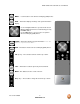
VIZIO VUR8 Universal Remote User Manual MENU – Use this button for the On-Screen Display (OSD) menus. INFO – This button displays the image and system information display. Use the NaVigation Wheel to operate the On-Screen Display (OSD) after it has been activated by pressing the MENU button. Use the OK button to select your chosen option in On-Screen Display (OSD) menus. GUIDE – This button displays program information. Note: this button is only functional for DTV.
VIZIO VUR8 Universal Remote User Manual A – When CABLE is selected and the code to match your Cable Box has been entered, this button will operate the Cable Box the same as this button on your Cable Remote. B – When CABLE is selected and the code to match your Cable Box has been entered, this button will operate the Cable Box the same as this button on your Cable Remote.
VIZIO VUR8 Universal Remote User Manual FREEZE/REV – Press this button to “Freeze-Frame” the current screen. Press this button again to display live video. This button also applies reverse play when using the remote to control your Cable/Satellite Box DVR, VCR or DVD Player. AUDIO/FF – Press this button to switch the audio from the main screen to the sub-screen while in PIP or POP mode (on models equipped with this function).
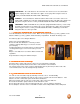
VIZIO VUR8 Universal Remote User Manual 1.1.4 Cleaning the Housing and Remote Control 1. 2. Use the VIZIO soft cloth (included) for cleaning. If the housing or remote control is seriously contaminated, use a soft cloth moistened with diluted neutral cleaner to clean the display. Wring water out of the cloth before cleaning to prevent water from penetrating into the housing. Wipe the display with a dry cloth after cleaning. 1.
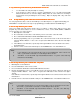
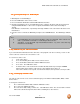
VIZIO VUR8 Universal Remote User Manual 1.2.3 Programming for DVD Player 1. 2. 3. 4. Manually turn on the DVD Player. Press the DVD button on the remote control. Press and hold the SET button until the LED LIGHT flashes twice. Find the programming code for your DVD player in the code list in the back of this book and enter it using the Number Buttons. If the code is accepted, the LED flashes twice after the last digit is entered.
VIZIO VUR8 Universal Remote User Manual 2.
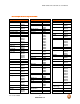
VIZIO VUR8 Universal Remote User Manual Setup Code for VCR’s Mitsubishi 20067, 20043 Motorola 20035, 20048 MTC 20240 Multitech 20072 NEC 20035, 20037, 20048, 20104, 20067, 20038 Newave 20037 Nikko 20037 Noblex 20240 Northgate 21972 Olympus 20035 Optimus 21062, 20162, 20037, 20048, 20104, 20432 Orion 20184, 20209, 20002, 20479 Panasonic 21062, 20035, 20162, 20616, 20225 Penney 20035, 20037, 20240, 20042, 20038 Pentax 20042 Philco 20035, 20479 Philips 20035, 20081, 20739, 20618 Pilot 20037 Pioneer 20042, 2006
VIZIO VUR8 Universal Remote User Manual Setup Code for Cable Converters ABC 00003, 00008, 00014 Americast 00899 Bell & Howell 00014 Bell South 00899 Clearmaster 00883 ClearMax 00883 Coolmax 00883 Daeryung 01877, 00877, 00477, 00008 Digi 00637 Director 00476 Dumont 00637 Gehua 00476 General 00476, Instrument 00810, 00276, 00003, 00014 GoldStar 00144 Hamlin 00009, 00273 Hitachi 00014 Jerrold 00476, 00810, 00276, 00003, 00012, 00014 KNC 00008 LG 00144 Memorex 00000 Motorola 00476, 00810, 00276, 01254, 01376 Mu
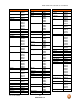
VIZIO VUR8 Universal Remote User Manual Setup Code for Satellite Receivers 00566, 00855, 00143, 01392 Samsung 01276, 01109, 01108 Sanyo 01219 SKY 00856 Sony 00639, 01640 Star Choice 00869 Tivo 01142, 01442 Toshiba 00749, 01749, 00790, 01285 UltimateTV 01640, 01392 Uniden 00724, 00722 US Digital 01535 USDTV 01535 Voom 00869 Zenith 00856, 01856 Setup Code for DVD Players Aiwa 20641, 21912 Akai 20770 Allegro 20869 Apex Digital 20672, 20717, 20797, 21061, 20796, 21056, 21937, 20794, 21020, 21915 Blaupunkt 20717
VIZIO VUR8 Universal Remote User Manual Setup Code for DVD Players Shinsonic 20533 Sonic Blue 20869, 21099 Sony 20533, 20864, 21033, 21904, 21903 SVA 20717 Sylvania 20675 Symphonic 20675 Teac 20717, 21984, 20809 Technics 20490 Theta Digital 20571 Toshiba 20503, 20695 V, Inc.
VIZIO VUR8 Universal Remote User Manual Setup Code for Audio Amp/Tuners Inkel 30027 Integra 30135 JBL 30110 JVC 30074, 31263 Kenwood 31313, 31570, 30027 KLH 31428 Magnavox 31189, 31269, 30531 Marantz 31189, 31269, 30039 MCS 30039 Onkyo 30842, 30135 Optimus 31023, 30670, 30531, 31074 Panasonic 31518, 30039 Philips 31189, 31269 Pioneer 31023, 30150, 30014, 30630, 30531 Proscan 31254 Qisheng 31609 Quasar 30039 RadioShack 31263 RCA 31023, 31609, 31254, 30531, 31074 Sharper Image 31263 Silsonic 30176 Sony 31058,
VIZIO VUR8 Universal Remote User Manual Setup Code for TV’s 10451, 10180, 10030, 10178, 10672, 11928, 10092, 10661, 11909, 10623, 10700 Dayu 10661 Dell 11080 Denon 10145 Dumont 10017 Durabrand 10463, 10180, 10178, 10171, 11034 Electroband 10000 Emerson 10154, 10236, 10463, 10180, 10178, 10171, 11944, 11909, 11929, 11905, 11928, 10623, 11911 Envision 10030 Ether 10030 Firstar 10236 Fisher 10154 Fortress 10093 Fujitsu 10809, 10853 Funai 10180, 10171, 11904 Furi 10145 Futuretech 10180 Gateway 11756, 11755 GE 1
VIZIO VUR8 Universal Remote User Manual Setup Code for TV’s 11911, 11926, 11924, 11920, 11927 MGA 10150, 10030, 10178, 11907 Midland 10047, 10017, 10051 Mitsubishi 10154, 10250, 10093, 10236, 10180, 11250, 10150, 10030, 10178, 11917, 10836 Monivision 10843, 10700 Motorola 10093 MTC 10060, 10030 Mudan 10051 Multitech 10180 NAD 10156, 10178, 10866 National 10051 NEC 10154, 10156, 10051, 10053, 10030, 10178, 11704 Newave 10093, 10178, 10092 Nikko 10030, 10178, 10092 Norcent 10748, 10824 NTC 10092 Onwa 10180 Op
VIZIO VUR8 Universal Remote User Manual Setup Code for TV’s Sansui 10463, 11904, 11935, 11929, 11911 Sanyo 10154, 10156, 10180, 10145, 11907 Sanyuan 10093 Scotch 10178 Scott 10236, 10180, 10178 Sears 10047, 10054, 10154, 10156, 10178, 10171, 11926, 11904 Shaofeng 10145 Sharp 10093, 10030, 10650, 11917 Shen Ying 10092 Shencai 10145 Sheng Chia 10093, 10236 Skygiant 10180 Skyworth 10748 Sony 11100, 10000, 10650, 11925, 11904 Soundesign 10180, 10178 Sowa 10156, 10051, 10060, 10178, 10092 Squareview 10171 SSS 10
VIZIO VUR8 Universal Remote User Manual 3.0 Teaching Teaching Remote Control It is recommended that both remotes have fresh batteries for the teaching function.Place teaching and learning remote controls no farther than 2” apart. If elapsed time between pressing keys is 10 seconds or longer the remote control will exit programming mode requiring you to start from Step 1. 3.1.1 Teaching the remote 1. Press and hold down the SET key until led blinks twice. 2.
VIZIO VUR8 Universal Remote User Manual Version 2/17/2009 19 www.VIZIO.
VIZIO VUR8 Universal Remote User Manual Version 2/17/2009 20 www.VIZIO.