
User`s manual




VIVOTEK
User's Manual - 77
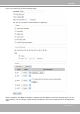
HTTP:SelecttosendthemedialestoanHTTPserverwhenatriggerisactivated.
■URL:EntertheURLoftheHTTPserver.
■Username:Entertheusernameifnecessary.
■Password:Enterthepasswordifnecessary.
ToverifyiftheHTTPsettingsarecorrectlycongured,clickTest. The result will be shown in a pop-up
windowasbelow.Ifsuccessful,youwillreceiveatest.txtleontheHTTPserver.
Click Save to enable the settings, then click Closetoexitthepage.
Network storage: Select to send themediales to a network storage location when a trigger is activated.
Please refer to Network Storage Setting on page 82 for details.
Click Save to enable the settings, then click Closetoexitthepage.
When completed, the new server settings will automatically be displayed on the Event Settings page.
Forexample: