
Specifications




13
Setting the OSD Language
The language that is displayed in the OSD can be changed. To change the language in
the OSD, perform the following steps:
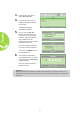
1. Enter the OSD menu. Press the ◄ or ► button to select the Installation I menu.
2. Press the ▲ or ▼ button until the cursor highlights the Language setting.
3. Press the ◄ or ► button until the language you want is shown in the cursor.
4. Press the EXIT button or MENU button twice to close the OSD.