
Specifications




10
3.
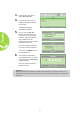
Press the ▲ or ▼ button to
select Security Lock.
4.
Press the ◄ or ► button to
enable or disable the security
lock function.
A password dialog box
automatically appears.
5.
You can use the ▲▼◄►
buttons located either on top
of the Qumi or on the remote
control to enter the password.
Any combination of the
navigation buttons can be used
(ve must be chosen).
Press the navigation buttons in
any order to set the password.
Then press the MENU button to
exit the dialog box.
6.
The password conrmation
menu appears when you power
on the Qumi when the Security
Lock is enabled.
Enter the password that was
created in step 5.
Important:
Keep the password in a safe place. Without the password, you will not be able to use
the Qumi. If you lose the password, contact your reseller for information on resetting the
password.