
Specifications




8
Starting and Shutting down the Qumi
1.
Connect the AC power adapter
to the Qumi. Connect the other
end of the AC power adapter to
a wall outlet.
Note:
Adapter models may vary
between regions.
2.
Then slide the POWER
switch to turn on the Qumi.
The Qumi splash screen
displays and connected devices
are detected.
See Setting an Access
Password (Security Lock) on
page 9 if security lock is
enabled.
3.
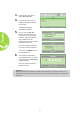
If more than one input device is
connected, press the SOURCE
button on the remote control
and use the ▲ or ▼ buttons to
select the applicable device or
press ▲ and ▼ or ◄ and ► at
the same time on the keypad on
the Qumi.
• VGA: Analog RGB,
Component: DVD
input YCbCr / YPbPr,
or HDTV input YPbPr
• Composite Video:
Traditional composite video
• HDMI: HDMI / DVI