
User manual




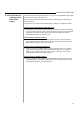

Plug the projector's power cord into the input socket located on the right side
of the projector, plug the three-pronged end of the power cord into a
grounded AC outlet.
When the projector is turned off, the fan will continue to run for
approximately 12 seconds to ensure that the projector and the lamp is
cooled down. To avoid thermal stress to the lamp, do not unplug the
power cord while the cooling fan is running.
0
!
!
!
!
!
Installing the projector on the ceiling must be done by a qualified
technician, do not attempt to install the projector yourself.
Only use the projector on a level, solid surface. If the projector falls to
the ground, the user may be injured and the projector severely
damaged.
Do not expose the projector in the moisture, dust, or smoke. This will
harm the projected images.
Make sure there is adequate ventilation around the projector. Do not
cover the vents on the side, front or bottom of the projector.
Do not use the projector where the temperatures vary greatly. The
projector must be used at temperatures between 32 F (0 C) and 95 F
(35 C).
0
0
WARNING
Projection distance(L)
Screen top
Screen bottom
Ventilation
space
CAUTIONS
2.3 Power
Connection
Installation & Setup
5
Ceiling Mount
!
!
If the projector is mounted on the ceiling and the image is upside down, use
the Menu and Up, Down, Left, Right button on your projector keypad or on
the remote control to correct the orientation.
The ventilation space shall be 20 cm from the projector foot to the ceiling.