
User manual




!
!
!
!
!
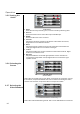
OSD
Language
BNC
Image Orientation
Rear Projection
Choose the OSD position to be in the left/middle/right corner of
upper/middle/lower part of the screen.
Select the languages of menu display: English, German, French,
Spanish, and Chinese.
Select "Inverted" to turn the image upside down when you put the
projector on the ceiling.
Select "On" to reverse the image when you put the projector behind
the translucent screen.
Select the source type when connecting the BNC terminal. When the
input source is the computer, select RGB. When the input source is the
video, select YUV.
Options Menu
3.5.3 Selecting the
Options
Operation
23