
User manual


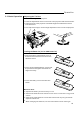


Selecting the Desired Image
Adjusting the Focus
Adjusting the Zoom of the Image
Press the Video button on the remote control to cycle through the video
inputs.(Composite, S-Video, Component)
Press the Data button on the remote control to cycle through the RGB
graphics inputs. (RGB, Component, DVI)
Press the Source button on the control keypad to start source auto scan
through composite Video, S-Video, component video (if connecting BNC
with video source), Analog RGB, component RGB (if connecting BNC with
computer source), and DVI.
Use the focus ring to obtain the best focus.
Use the Zoom lever to adjust the image size on the screen.
Use Keystone correction to keep the image square.
Zoom lever
Focus ring
MENU
POWER
LASER
DATA
KEYSTONE
ZOOM
AUTO
VIDEO
FREEZE
LM
RM
DOWN
UP
Operation
Data button
LEFT
RIGHT
VOL-
VOL+
LAMP
SOURCE
MENU
PO
ER
W
Source
button
Video
button
17