
User manual


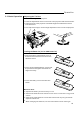


The remote control can be used as a wireless mouse by connecting the
projector mouse port to the computer mouse port.
Connecting the big end of the PS/2 mouse cable (9 pin) to the projector
mouse port.
Connecting the small end of the PS/2 mouse cable (6 pin) to the
computer's mouse port.
For a Macintosh computer, connect the USB mouse or PS/2 mouse.
Connecting the Mouse:
How to Use the Remote Control as a Wireless Mouse:
!
!
!
!
!
!
!
!
Right Mouse button
Left Mouse button
Moving the Cursor
Select Item
Drag
The right mouse button is
marked RM on the right of the
remote control.
The left mouse button is
marked LM on the left of the
remote control.
Use the mouse pointer button
to move the cursor left, right,
up, down.
Move the cursor to item and
press the LM button.
While pressing the LM button,
press the mouse pointer
button to drag in the desired
direction.
DVI
COMPUTER
PC AUDIO
AUDIO OUT
L- AUDIO -R VIDEO
MOUSE
RS232C
S-VIDEO
To Mouse PS/2
terminal
To Mouse (PS/2)
terminal
To Mouse (USB)
terminal
2.5 Mouse Functions
MENU
POWER
LASER
DATA
KEYSTONE
ZOOM
AUTO
VIDEO
FREEZE
LM
RM
LEFT
RIGHT
VOL -
DOWN
UP
Right
Mouse
button
Left Mouse
button
Mouse
pointer
button
Installation & Setup
R/R-YG-Y
B/B-Y
H/C.SYNC.
V.SYNC.
VOL+
Mouse cable
(supplied)
11