
User Guide
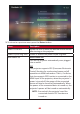


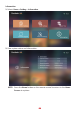


Table Of Contents
- Safety Precautions
- Safety Precautions - Ceiling Mounting
- Introduction
- Initial Setup
- Making Connections
- Using the Projector
- Operating the Projector
- Appendix
- Regulatory and Service Information

8181
3. To return to a previous menu press the Return buon.
Menu Descripon
Power On Source Allows the user to enter the desired source directly
aer turning on the projector.
Power On/O Ring Tone Enable or disable the power on/o ring tone.
Auto Power On Direct Power On
Turn on the projector automacally once plugged
into an outlet.
CEC
This projector supports CEC (Consumer Electronics
Control) funcon for synchronized power on/o
operaon via HDMI connecon. That is, if a device
that also supports CEC funcon is connected to the
HDMI input of the projector, when the projector’s
power is turned o, the power of the connected
device will also be turned o automacally. When
the power of the connected deice is turned on, the
projector’s power will be turned on automacally.
NOTE: Ensure both the projector’s and the
connected device’s CEC funcon are
turned on.