
User Guide



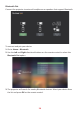


Table Of Contents
- Safety Precautions
- Safety Precautions - Ceiling Mounting
- Introduction
- Initial Setup
- Making Connections
- Using the Projector
- Operating the Projector
- Appendix
- Regulatory and Service Information

25
3. When the below dialogue box appears, select Yes and press OK on the remote
control to enter Bluetooth mode.
4. A sound eect will be audible upon entering pairing mode.
5. Upon successful connecon, another sound eect will be audible.
NOTE:
• The projector’s name will be labeled as “X10-4K”.
• Once paired, if both the projector and your device are powered on they will
automacally connect via Bluetooth. When connected please note:
» Only the Power and Return buons can exit Bluetooth mode.
» If a 3.5 mm audio cable is plugged into the Audio In socket, the audio
signal will switch to line in automacally.