
User Guide

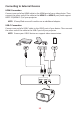




Table Of Contents
- Safety Precautions
- Safety Precautions - Ceiling Mounting
- Introduction
- Initial Setup
- Making Connections
- Using the Projector
- Operating the Projector
- Appendix
- Regulatory and Service Information

22
Connecng to External Devices
HDMI Connecon
Connect one end of an HDMI cable to the HDMI port of your video device. Then
connect the other end of the cable to the HDMI 1 or HDMI 2 port (both support
HDCP 2.0/HDMI 2.2) of your projector.
NOTE: iPhone/iPad users will need to use an addional adapter.
USB-C Connecon
Connect one end of a USB-C cable to the USB-C port of your device. Then connect
the other end of the cable to the USB-C port of your projector.
NOTE: Ensure your USB-C device can support video transmission.