
Manual




18
Connection Manager
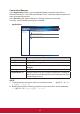
In the Applications section, you can add/edit/delete connection shortcuts for
Microsoft RemoteFX, Citrix HDX and VMware PCoIP, and setup advance options for
each corresponding protocol.
In the Devices page, global settings for VDI/App connections are listed.
Currently, sound recording settings are available.
• Applications
Connection Manager
Navigator Applications
Applications Devices Refresh
Microsoft RemoteFX
Citrix HDX
VMware PColP
Microsoft RemoteFX Available Connections: 2
Configure Microsoft RemoteFX/RDP Protocol connection settings.
Citrix HDX Available Connections: 2
Configure Citrix HDX connection settings.
VMware PColP Available Connections: 2
Configure VMware PColP/RDP connection settings.
Label Description
Applications Display Applications page.
Devices Display Devices page.
Refresh Reload connection status which may be modied by Device
Manager.
Navigator list Add/Delete connection lists on different protocol.
Applications list Displays statistics for the 3 protocol connections. Clicking on
each protocol row will also switch to the connection list of the
corresponding protocol.
NOTE:
1. These characters cannot be used in a connection name: ~ ` ! @ # $ % ^ & * ( ) +
= { } [ ] | \ : ; " ' < , > . ? /
2. Blank spaces and the following characters cannot be used in server addresses:
~ ` ! @ # $ % ^ & * ( ) + = { } [ ] | \ ; " ' < , > ? /