
User Guide


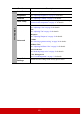

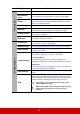


Table Of Contents
- Table of contents
- Important safety instructions
- Introduction
- Positioning your projector
- Connection
- Operation
- Starting up the projector
- Using the menus
- Utilizing the password function
- Switching input signal
- Adjusting the projected image
- Magnifying and searching for details
- Selecting the aspect ratio
- Optimizing the image
- Setting the presentation timer
- Hiding the image
- Locking control keys
- Operating in a high altitude environment
- Using the CEC function
- Using the 3D functions
- Controlling the projector through a LAN environment
- Using the projector in standby mode
- Adjusting the sound
- Shutting down the projector
- Menu operation
- Maintenance
- Troubleshooting
- Specifications
- Copyright information

47
Main menu Sub-menu Options
6. SYSTEM
Language
Multi-language OSD
selection
Projector Position
Front Table/Rear Table/
Rear Ceiling/Front
Ceiling
Menu Settings
Menu Display Time
5 sec/10 sec/15 sec/20
sec/25 sec/30 sec
Menu Position
Center/Top-Left/Top-
Right/Bottom-Left/
Bottom-Right
High Altitude Mode On/Off
Quick Auto Search Off/On
Security Settings
Change Password
Power On Lock Off/On
Panel Key Lock Off/On
Remote Control Code 1/2/3/4/5/6/7/8
Baud Rate
115200/2400/4800/9600/
14400/9200/38400/
57600
7.
INFORMATION
• Source
• Color Mode
• Resolution
• Color System
• IP Address
• MAC Address
• Firmware Version
• 3X Fast Input
• S/N