
User Guide


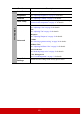

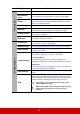


Table Of Contents
- Table of contents
- Important safety instructions
- Introduction
- Positioning your projector
- Connection
- Operation
- Starting up the projector
- Using the menus
- Utilizing the password function
- Switching input signal
- Adjusting the projected image
- Magnifying and searching for details
- Selecting the aspect ratio
- Optimizing the image
- Setting the presentation timer
- Hiding the image
- Locking control keys
- Operating in a high altitude environment
- Using the CEC function
- Using the 3D functions
- Controlling the projector through a LAN environment
- Using the projector in standby mode
- Adjusting the sound
- Shutting down the projector
- Menu operation
- Maintenance
- Troubleshooting
- Specifications
- Copyright information

46
Main menu Sub-menu Options
4.
BASIC
My Button
Auto/Projection (Projector Position)/Menu
Position/Color Temp./Brightness/Contrast/3D
Settings/Screen Color/Splash Screen/
Message/Quick Auto Search/CEC/DCR/Closed
Caption/Power Saving/Freeze/INFORMATION/
Aspect Ratio/Power Out
5.
ADVANCED
3D Settings
3D Sync
Auto/Off/Frame
Sequential/Frame
Packing/Top-Bottom/
Side-by-Side
3D Sync Invert Disable/Invert
HDMI Settings
HDMI Format Auto/RGB/YUV
HDMI Range Auto/Enhanced/Normal
LAN Control
Settings
LAN Settings DHCP ON/Static IP
Projector IP Address
Subnet Mask
Default Gateway
DNS Server
Standby LAN Control Off/On
Apply
Lamp Settings
Lamp Mode
Normal/Eco/Dynamic/
SuperEco
Reset Lamp Hours
Lamp Hours
Filter Settings
Filter Mode On/Off
Reset Filter Hours Reset/Cancel
Filter Hours
DCR On/Off
Closed Caption Caption Version CC1/CC2/CC3/CC4
Reset Settings Reset/Cancel