
User Guide


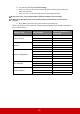


Table Of Contents
- Table of contents
- Important safety instructions
- Introduction
- Positioning your projector
- Connection
- Operation
- Starting up the projector
- Using the menus
- Utilizing the password function
- Switching input signal
- Adjusting the projected image
- Magnifying and searching for details
- Selecting the aspect ratio
- Optimizing the image
- Setting the presentation timer
- Hiding the image
- Locking control keys
- Operating in a high altitude environment
- Using the CEC function
- Using the 3D functions
- Controlling the projector through a LAN environment
- Using the projector in standby mode
- Adjusting the sound
- Shutting down the projector
- Menu operation
- Maintenance
- Troubleshooting
- Specifications
- Copyright information

38
Please pay attention to the limitation of input length (including space and other punctuation
keys) in the list blow:
/ > < $ % + \ ' " are prohibited.
Category Item Input Length
Maximum Number
of Characters
Network Settings
Network
DHCP/Manual (N/A)
IP Address XXX.XXX.XXX.XXX
Subnet Mask XXX.XXX.XXX.XXX
Gateway XXX.XXX.XXX.XXX
DNS Server XXX.XXX.XXX.XXX
AMX device discovery (N/A)
Password
Administrator (N/A)
New Password 4
Confirm Password 4
SNMP
SysLocation 22
SysName 22
SysContact 22
Email Alert
Email Setting
To 40
Cc 40
Subject 40
From 40
SMTP Setting
Server 30
User Name 21
Password 14
Alert Condition
Fan Error (N/A)
Lamp Error (N/A)
Over Temperature (N/A)
Lamp Time Alert (N/A)
Submit (N/A)
Issue Test Mail (N/A)