
User Guide


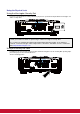


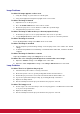


Table Of Contents
- S2 ViewSonic Pro9 UM-VS-EN-20160706.pdf
- Getting Started
- Setup and Operation
- On-Screen Display (OSD) Menu Settings
- Maintenance and Security
- Troubleshooting
- Specifications
- Regulatory Compliance
- Appendix I
- Appendix II

58
Resetting the Lamp Time
After replacing the lamp, you should reset the lamp hour counter to zero. Refer to the following:
2.
Press the MENU button to open
the OSD menu.
3.
Press the cursor ◄► button to
move to the Advanced menu.
Press the cursor button to move
down to Advanced.
4.
Press the cursor ▼▲ button to
move down to Lamp Hour Reset.
5.
Press the cursor (Enter) / ►
button.
A message screen appears.
6.
Press ▼▲◄► buttons to reset
the lamp hour.
7.
Press the MENU button to get
back to Advanced.