
User Guide


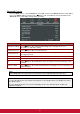
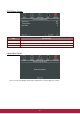


Table Of Contents
- S2 ViewSonic Pro9 UM-VS-EN-20160706.pdf
- Getting Started
- Setup and Operation
- On-Screen Display (OSD) Menu Settings
- Maintenance and Security
- Troubleshooting
- Specifications
- Regulatory Compliance
- Appendix I
- Appendix II

43
3D
ITEM
DESCRIPTION
3D
Press ◄► to select Off, DLP-Link or IR.
3D Sync Invert
Press ◄► to turn 3D Sync Invert On or Off.
3D Format
Press ◄► to enable or disable 3D Format.
Network Setting
ITEM
DESCRIPTION
Network State
Displays the network connection status.
DHCP
Press ◄► to turn DHCP On or Off.
Note: If you select DHCP Off, complete the IP Address, Subnet Mask, Gateway, and
DNS fields.
IP Address
Enter a valid IP address if DHCP is turned off.
Subnet Mask
Enter a valid Subnet Mask if DHCP is turned off.
Gateway
Enter a valid Gateway address if DHCP is turned off.
DNS
Enter a valid DNS name if DHCP is turned off.
Apply
Press (Enter) / ► to confirm settings.